Tutorial 8. Batch Processing
If the number of frames (files) to process exceeds the defined batch_size (default: 32),
the Batch() mode is activated automatically.
At the initialization step (analysis = pygid.Conversion(...)), images are not loaded into memory.
When conversion functions (det2q_gid, det2pol_gid, etc.) are called, the raw data paths are
split into batches and processed sequentially.
In batch mode:
Converted images are not plotted.
Results cannot be returned directly to the workspace, except when
average_all=Trueorsum_all=True.Only saving to disk is supported, except for the averaged or summed result when
average_all=Trueorsum_all=True.
Parameters
batch_size– maximum number of frames or files processed per batch. Default:32.multiprocessing– enables multiprocessing for faster batch execution.plot_result– must beFalse(plotting is disabled in batch mode).save_result– must beTrueto store converted data in HDF5/NXsas format.path_to_save– path where converted data will be saved.overwrite_file– whether to overwrite an existing result file.
Example
In the example below, batch_size is set to 2 to explicitly activate batch processing. Total number of frames in the raw data file: 13.
from pygid.datasets import get_dataset

# Download example dataset from Zenodo
try:
    files = get_dataset("tutorial_07")
    poni_path = files["poni"]
    mask_path = files["mask"]
    # several files for batch processing
    data_path = files["data"]
except:
    print("Dataset download skipped on Read the Docs.")
Dataset download skipped on Read the Docs.
import pygid

params = pygid.ExpParams(
    poni_path=poni_path,
    mask_path=mask_path,
    ai=0.004,
    fliplr=True,
    flipud=True
)

matrix = pygid.CoordMaps(
    params,
    vert_positive=True,
    hor_positive=True,
)

analysis = pygid.Conversion(
    matrix=matrix,
    path=data_path,
    dataset='/entry_0000/ESRF-ID10/eiger4m/data',
    frame_num = None,             # all image
    batch_size=2,                 # limit of the batch size
)
print(f"loaded images: {analysis.img_raw}")
INFO - Number of frames (13) is more than 2. The batch processing has been activated.
loaded images: None
NOTE: images are not loaded
analysis.det2q_gid(save_result=True,
                   path_to_save='result.h5')
INFO - Saved in D:\PhD\mlgid\pygid\docs\tutorials\result.h5 in group entry_0000
INFO - Saved in D:\PhD\mlgid\pygid\docs\tutorials\result.h5 in group entry_0000
INFO - Saved in D:\PhD\mlgid\pygid\docs\tutorials\result.h5 in group entry_0000
INFO - Saved in D:\PhD\mlgid\pygid\docs\tutorials\result.h5 in group entry_0000
INFO - Saved in D:\PhD\mlgid\pygid\docs\tutorials\result.h5 in group entry_0000
INFO - Saved in D:\PhD\mlgid\pygid\docs\tutorials\result.h5 in group entry_0000
INFO - Saved in D:\PhD\mlgid\pygid\docs\tutorials\result.h5 in group entry_0000
analysis.det2q_gid(save_result=True,
                   path_to_save='result.h5',
                   plot_result=True)
INFO - Saved in D:\PhD\mlgid\pygid\docs\tutorials\result.h5 in group entry_0000
INFO - Saved in D:\PhD\mlgid\pygid\docs\tutorials\result.h5 in group entry_0000
INFO - Saved in D:\PhD\mlgid\pygid\docs\tutorials\result.h5 in group entry_0000
INFO - Saved in D:\PhD\mlgid\pygid\docs\tutorials\result.h5 in group entry_0000
INFO - Saved in D:\PhD\mlgid\pygid\docs\tutorials\result.h5 in group entry_0000
INFO - Saved in D:\PhD\mlgid\pygid\docs\tutorials\result.h5 in group entry_0000
INFO - Saved in D:\PhD\mlgid\pygid\docs\tutorials\result.h5 in group entry_0000
D:\PhD\mlgid\pygid\pygid\conversion.py:304: UserWarning: Plotting and returning of the result are not supported in batch analysis mode.
  warnings.warn("Plotting and returning of the result are not supported in batch analysis mode.",
NOTE: plotting is not supported
The Batch processing works for all two-dimensional conversions and radial profiles (see Tutorials 4-5):
analysis.radial_profile_gid(save_result=True,
                   path_to_save='result.h5',
                   plot_result=True)
In combination with averaging:
analysis = pygid.Conversion(
    matrix=matrix,
    path=data_path,
    dataset='/entry_0000/ESRF-ID10/eiger4m/data',
    frame_num = None,             # all image
    batch_size=2,                 # limit of the batch size
    average_all=True,             # average all frames
)
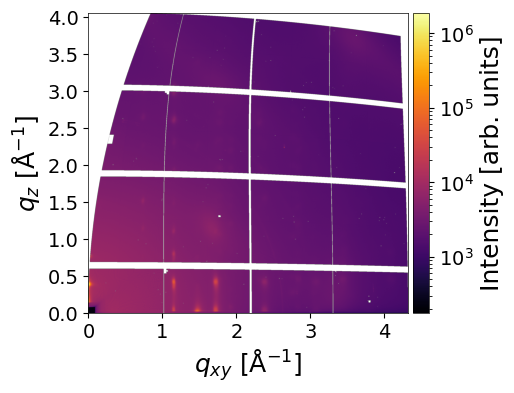
analysis.det2q_gid(save_result=True,
                   path_to_save='result.h5',
                   plot_result=True)
INFO - Number of frames (13) is more than 2. The batch processing has been activated.
INFO - Saved in D:\PhD\mlgid\pygid\docs\tutorials\result.h5 in group entry_0000